
Accelerated Mobile Pages (AMP), a simple and elegant solution that can streamline the information much faster without all the extra baggage that a typical website has. It loads instantly and dramatically improves the performance of the mobile sites. AMP is an open source initiative build in collaboration with many different partners. AMP is just like a normal HTML website with a couple of restrictions on the extra baggage. So let’s implement AMP on WordPress.
Walk through the below steps to enable AMP for your website
There are three methods to Activate AMP for your website (use any one of the method)
METHOD 1:
- Login to WordPress Admin option panel –> Plugins –> Add New –> Search for “Accelerated Mobile Pages” (By Ahmed Kaludi, Mohammed Kaludi) –> Click Install –> Click Activate.


Accelerated Mobile Pages is successfully activated.
Method 2:
- Click Here to download Accelerated Mobile Pages Plugin by Kaludi Brothers.

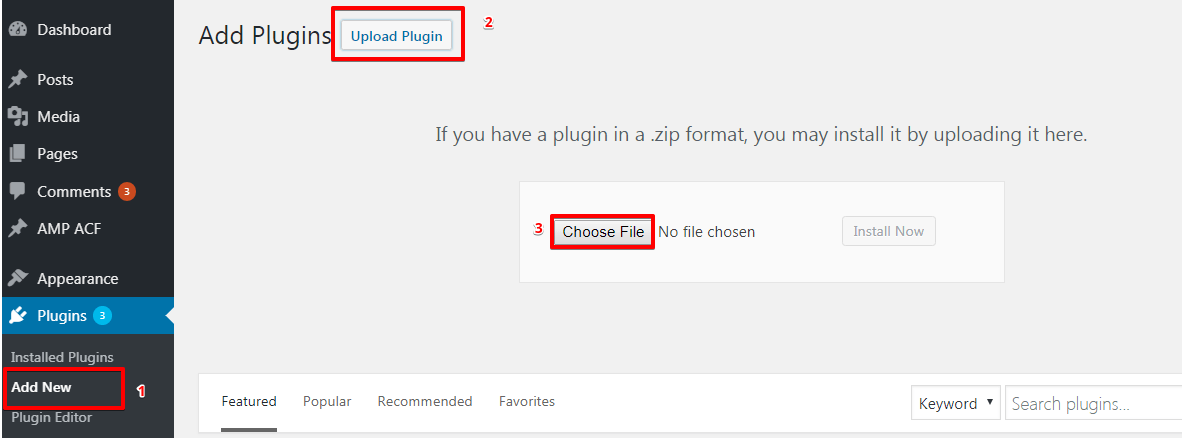
- Login to WordPress Admin option panel –> Plugins –> Add New –> Upload Plugin –> Choose file (Navigate to your Downloads folder then Select Downloaded zip file) –> Install Now –> Activate.
METHOD 3:
Extract the downloaded Zip files

Login to your FTP client (Here we are using Filezilla) –> Navigate to Root Directory –> WpContent –> Plugins –> Upload the extracted folders
Login to WordPress Admin panel –> Plugins –> Now Activate the uploaded plugins.
Conclusion
Google AMP pages look kind of interesting because the AMP enabled pages to load 4x faster than standard pages. Integrating AMP on WordPress website is easy and it enables you to stay on top in all Search Engines, glean the rewards without any hard work.
That’s it for this tutorial!
We hope it helped you. If you have any feedback or questions, then please share them in the comments section below.
Really a very good initiative Mohammed Kaludi
e hope to further develop and update your amp. Thank you
http://seha.yourheealth.com
http://yourheealth.com
How to add auto ads in https://www.techsuryasingh.com/ website.
Hi SURYA SINGH,
Please follow this tutorial – https://ampforwp.com/tutorials/article/how-to-set-auto-ads-in-amp/ will you please check now and let us know.
I recently activated amp at https://azproquotes.com
hello Team i am currently using Version 0.9.97.43 of amp when i update to the latest one my single post page become very strange, all spaces and line break are not visible as content become incomprehensible as spaces between lines were removed. how to fix this problem.
Hi iLyricsHub,
When we rollback to the Version 0.9.97.43 and then update to the latest version the single posts are appearing fine will you please contact our support team – https://ampforwp.com/support/ we will personally help you.
Hello, thank you for the plugin. Today the Google Search Console has the following message for me: “Server error (5xx). First detected: 5/19/19. Status: Error” for https://www.resumetech.guru/finding-arete-your-purpose/amp/ which was last crawled on May 18, 2019. Since I’m new to WP and not a programmer, could you please advise how to fix this issue?
Thank you in advance.
Hi Monique Montanino,
Will you please contact our support team from here – https://ampforwp.com/support and they will help you to fix this issue.
I am having trouble in activating amp at this site https://howtechpro.com
Hi Howtechpro,
May I know what trouble issue you’re facing when you’re activating the amp at your site?
Hello Team,
My domain – addonwebsolutions.com
When I install and activated this plugins, suddenly my site is shut down. Please tell me about issues.
Thanks
Hi Addon Web Solutions,
We have checked your website and found that amp in not activated on your website will you please contact our technical team – https://ampforwp.com/support/ and they will help you to fix the issue as soon as possible.
You appear to have installed the AMP plugin incorrectly. It is currently installed in the amp-wp directory, but it needs to be placed in a directory named amp. Please rename the directory. This is important for WordPress plugin auto-updates.
This is what nexus/wordpress is telling me. I looked online and it says to go to my plugin dashboard but I don’t have one.
Hi hannah macleod,
It will be installed in the plugin folder of your WordPress directory, not in the amp-wp directory, will you please provide us screenshots exactly where you are seeing amp-wp directory so that we will understand and let you know.
Hi, it does not work, my website after installing amp looks awful.
My side column doesn’t show and my header image is reduced to a fine line.
Hi Silvia Spurway,
Will you please provide us screenshots exactly where you are getting issues so that we will understand and let you know.