
Accelerated Mobile Pages (AMP), a simple and elegant solution that can streamline the information much faster without all the extra baggage that a typical website has. It loads instantly and dramatically improves the performance of the mobile sites. AMP is an open source initiative build in collaboration with many different partners. AMP is just like a normal HTML website with a couple of restrictions on the extra baggage. So let’s implement AMP on WordPress.
Walk through the below steps to enable AMP for your website
There are three methods to Activate AMP for your website (use any one of the method)
METHOD 1:
- Login to WordPress Admin option panel –> Plugins –> Add New –> Search for “Accelerated Mobile Pages” (By Ahmed Kaludi, Mohammed Kaludi) –> Click Install –> Click Activate.


Accelerated Mobile Pages is successfully activated.
Method 2:
- Click Here to download Accelerated Mobile Pages Plugin by Kaludi Brothers.

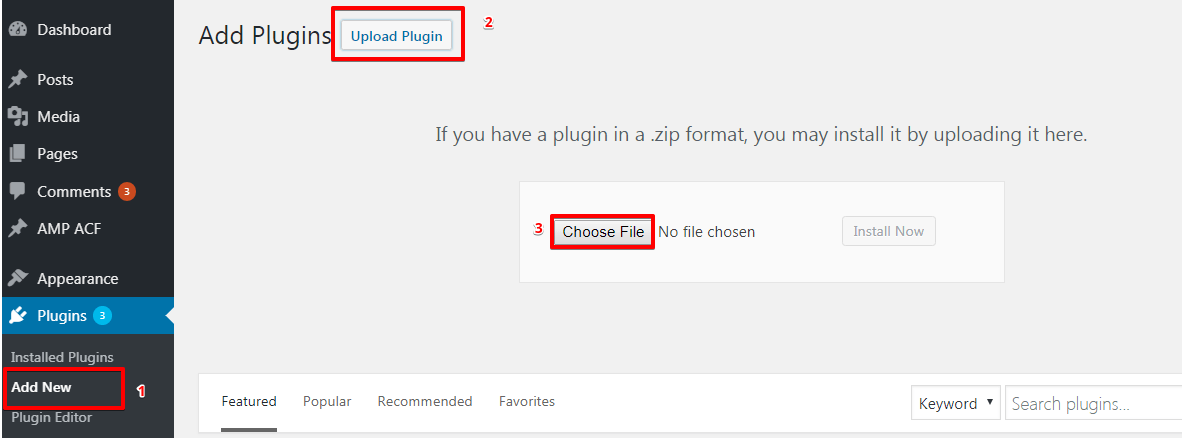
- Login to WordPress Admin option panel –> Plugins –> Add New –> Upload Plugin –> Choose file (Navigate to your Downloads folder then Select Downloaded zip file) –> Install Now –> Activate.
METHOD 3:
Extract the downloaded Zip files

Login to your FTP client (Here we are using Filezilla) –> Navigate to Root Directory –> WpContent –> Plugins –> Upload the extracted folders
Login to WordPress Admin panel –> Plugins –> Now Activate the uploaded plugins.
Conclusion
Google AMP pages look kind of interesting because the AMP enabled pages to load 4x faster than standard pages. Integrating AMP on WordPress website is easy and it enables you to stay on top in all Search Engines, glean the rewards without any hard work.
That’s it for this tutorial!
We hope it helped you. If you have any feedback or questions, then please share them in the comments section below.
Great article. I’m facing a few of these issues as well..|
Hi Keeley Deters,
Can you please tell us exactly what issues you are facing so that we can help you.
great points altogether, you simply gained a new reader. What would you suggest in regards to your post that you made some days ago? Any positive?
Hi Graig Mosgrove,
Will you please tell us of which post you are talking about? So that I can say to you.
Hi,
I see that you have one extension for elementor compatibility. Does it convert all blog post and pages as it is? I mean the actual mobile version and AMP version will be same? Please confirm on this. Below if my blog link so that you can suggest better.
https://www.riansclub.com
Hi Rajib,
Will you please contact our technical team from here- https://ampforwp.com/support/ they will help you as soon as possible.
Hello, my website is https://www.csitweb.com/. Google ads are not working in some of the amp pages however, ads are fine on desktop.
Kindly solve the issue-
Some of the URLS where ads are not showing are as below-
https://www.csitweb.com/distributed-database-mcq-with-answers/
https://www.csitweb.com/online-mcqs-test-mobile-computing-mcq-with-answers/
https://www.csitweb.com/11-simple-rules-writing-literature-review-examples-templates/
etc.
Hi Mamta Bansal,
Will you please contact our technical team from here- https://ampforwp.com/support/ they will help you as soon as possible.