
Tutorial to set up the sidebar in homepage and single page.
1. The sidebar only works in the Swift theme.
2. You will find this option in the WordPress dashboard -> AMP option panel -> Design -> click on Global option-> Enable the sidebar option and select where you want to display the sidebar.

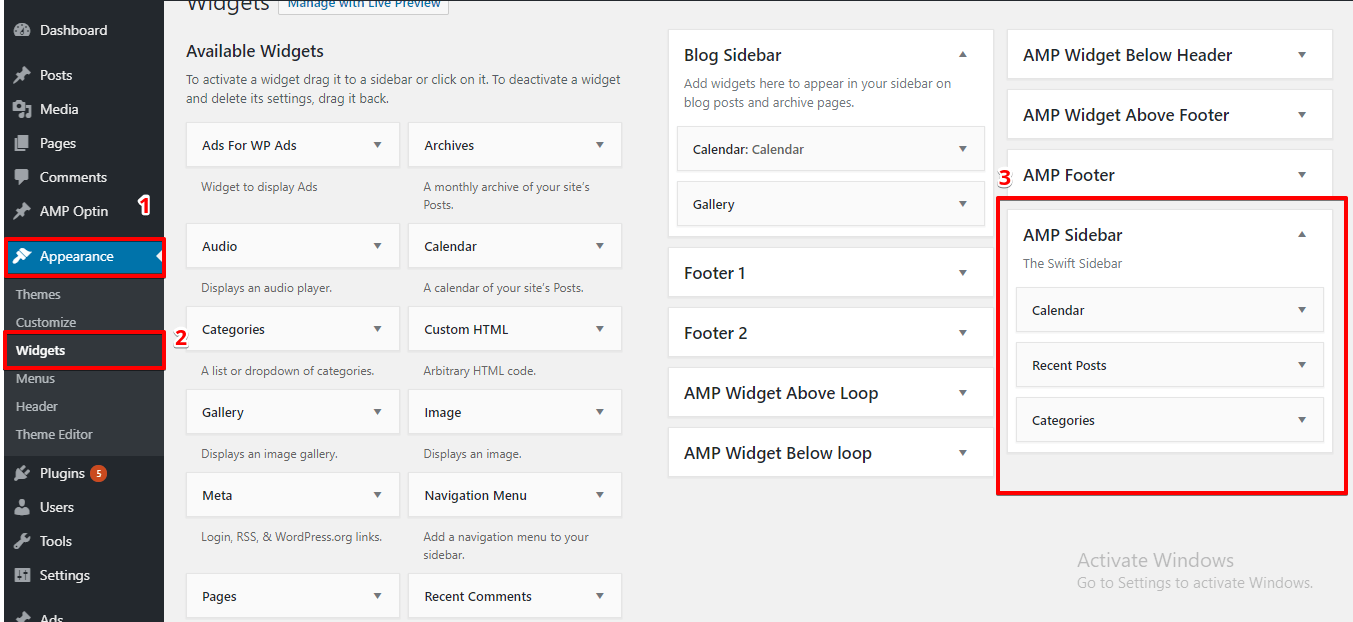
3. Go to WordPress dashboard -> Appearance -> In the widget section, you will find the Sidebar widget where you can drag and drop the widgets which you want to display in the sidebar.
The Output of the Sidebar in AMP

That’s it for this tutorial!
We hope it helped you. If you have any feedback or questions, then please share them in the comments section below.
Hello, I want to use this sidebar in another theme. Can you please give me the function code so that I can use that?
Hi Abid Hasan,
Will you please follow this tutorial – https://ampforwp.com/tutorials/article/how-to-remove-add-options-in-the-amp-panel/ And If you have any issues/problems after following this tutorial also then please let us know and we will personally help you.
116/5000
Hello, AMP Sidebar does not appear in my widget section. All the others appear.
Is there any way to enable it?
Hi REINALDO IVES DE OLIVEIRA,
Will you please contact our technical team from here- https://ampforwp.com/support/ they will help you as soon as possible.
how do I activate the sidebar only on the desktop and not on mobile?
Hi Gustavo Neves,
Will you please contact our technical team from here- https://ampforwp.com/support/ they will help you as soon as possible.
How to add custom sidebar in AMP for every post. i did tried using custom sidebars plugin it works well for non AMP but doesn’t work for AMP.
Hi Deepak,
Will you please contact our technical team from here- https://ampforwp.com/support/ they will help you as soon as possible.
Hi Deepak,
how can I disable the sidebar in amp version ?
Hi Maryam,
Will you please disable the sidebar option by using this option helps to enable/disable this sidebar in AMP.
For this follow these steps WordPress dashboard -> AMP option panel -> Design -> click on Global option-> disable the sidebar option and then click on the “Save Changes” button.
Follow this tutorial – https://ampforwp.com/tutorials/article/how-to-setup-sidebar-in-amp/
and still, if you are facing any issue/problem then contact our technical team – https://ampforwp.com/support/ they will help you as soon as possible.