
Follow the simple steps:
Step 1: Go to WordPress dashboard -> select the Pages in which you want to use AMP page builder ->Use Builder here you need to check this option.

Step 2: Next, click on the Pre-built AMP Layouts button.

Step 3: Once you click on this then the page will appear on the screen select the Import/ Export option.

Step 4: If you want to export the current layout (design) than you need to click on the export button then JSON file will be downloaded.

Step 5: Once you download the JSON file then go to that particlar page where you want the same design or layout then you need to import JSON file which you have downloaded.
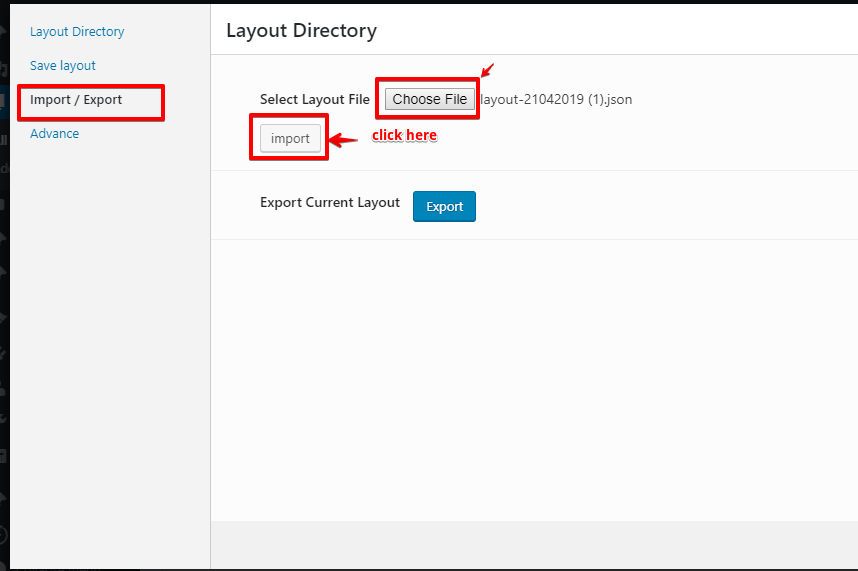
Note: Once you imported the JSON file then it will be replaced by the current design.
That’s it for this tutorial!
We hope it helped you. If you have any feedback or questions, then please share them in the comments section below.
I have issues when exporting and saving the layout. I can export 3 pages but cannot export the other 5. Could you please help me have a look, video recording link https://youtu.be/pjG39SbAUpE? Thank you!
Hi Kiki,
Will you please contact our technical team from here- https://ampforwp.com/support/ they will help you as soon as possible.
How to edit the footer, if we are not having Appearance option in WordPress.
Hi Farheen Ansari,
Will you please contact our technical team from here- https://ampforwp.com/support/ they will help you as soon as possible.