
This error occurs when the property name inside an attribute isn’t allowed.
If you are getting this type of error “Disallowed attribute or attribute value present in HTML tag.” like below the screenshot.

For example, In select tag, if you are creating the mid attribute. The validation error comes due to the attribute that you are using for creating. Please see the below
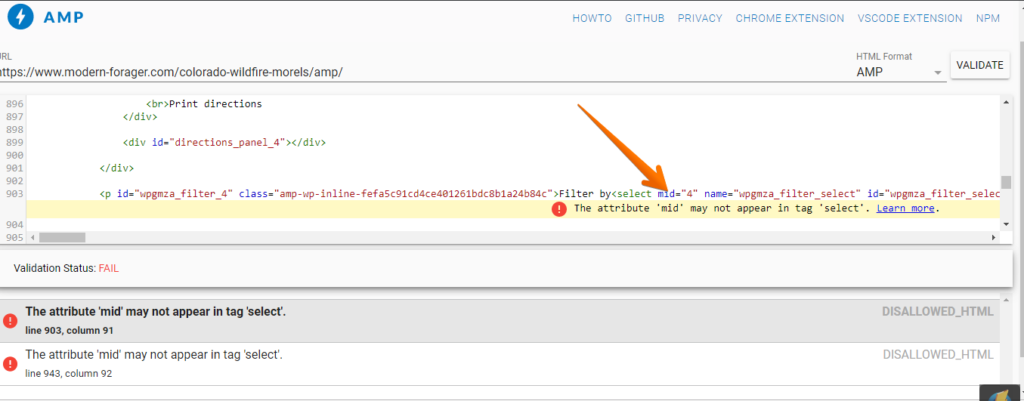
For this, you need to remove this mid attribute once you remove mid attribute then check on this website – https://validator.ampproject.org/ is your page Valid or not
That’s it for this tutorial!
We hope it helped you. If you have any feedback or questions, then please share them in the comments section below.
Hi, i have error in my site ” https://worldexnews.com ” like this :- Disallowed attribute or attribute value present in HTML tag
Hi Rahman RB,
Will you please contact our technical team from here- https://ampforwp.com/support/ they will help you as soon as possible.
I can’t understand ,here is link check it https://validator.ampproject.org/#url=https%3A%2F%2Fworldexnews.com%2F
Hi Rahman RB,
Will you please elaborate more about your issue so that we will understand and help you.
Hello, There/Sonali,
As you are telling us that we have to remove that code,
Ok, I understand and able to do this in any static or any custom dynamic site but can you tell me, How can do this same a WordPress site?
Hi Vishal Kumar,
Will you please contact our technical team from here- https://ampforwp.com/support/ they will help you as soon as possible.
Hi, I face this amp problem on my site please guide thanks
Hi Abdul Razzaq,
Will you please elaborate more about your issue so that we will understand and help you.
hello mam please check my website, it shows the same error.
https://www.truthsawer.com/
Hi Nitish Thakur,
We have checked your website and found that there is no error at the moment and still if you are facing an issue/problem then contact our technical team – https://ampforwp.com/support/ they will help you as soon as possible.
I have got the same error on my page : https://digitaldopes.com/raspberry-pi-4-heatsink-placement-installation-guide/ and it’s not getting fixed can you please help me exactly what to do.
I got this error on AMP version of the page.
Hi Nilesh Ranjan Roy,
Will you please contact our technical team from here- https://ampforwp.com/support/ they will help you as soon as possible.
disallowed attribute or attribute value present in HTML tag.
I have found this issue on bellow URL of my web site ..please help me for fix the issue.
https://bollywoodglamsham.com/naina-singh/
https://bollywoodglamsham.com/brenda-song/
https://bollywoodglamsham.com/10-things-mens-should-stop-doing-that-girls-dont-like/
Hi Preety,
Will you please contact our technical team from here- https://ampforwp.com/support/ they will help you as soon as possible.
Hello, in reference to the disallowed attributes like the 2 that come up within my website are the words “action” and “target”, would I just go into the code and delete those words manually or pin point why it’s in there in the first place?
Hi Daniel D Stevens,
Will you please contact our technical team from here- https://ampforwp.com/support/ they will help you as soon as possible.
I have created a Post on How To Change The Download Location In Google Chrome and the link to the post is https://digitaldopes.com/how-to-change-the-download-location-in-google-chrome/ I am getting “disallowed attribute value present in HTML tag” error in webmaster tool and I checked in https://validator.ampproject.org, found The attribute ‘srcset’ in tag ‘amp-img’ is set to the invalid value.
I want to correct it, I am using WordPress with the AMP plugin and how can i correct this please guide me sir.
Hi Nilesh Ranjan Roy,
Will you please contact our technical team from here- https://ampforwp.com/support/ they will help you as soon as possible.