
This error occurs when the property name inside an attribute isn’t allowed.
If you are getting this type of error “Disallowed attribute or attribute value present in HTML tag.” like below the screenshot.

For example, In select tag, if you are creating the mid attribute. The validation error comes due to the attribute that you are using for creating. Please see the below
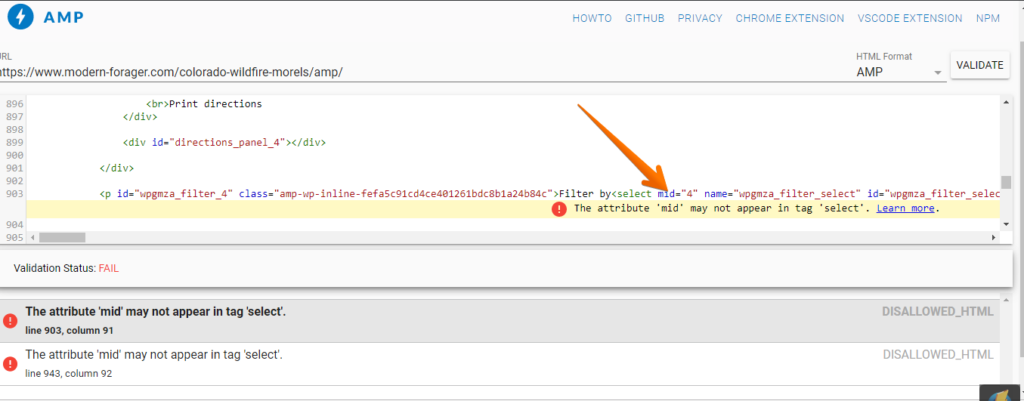
For this, you need to remove this mid attribute once you remove mid attribute then check on this website – https://validator.ampproject.org/ is your page Valid or not
That’s it for this tutorial!
We hope it helped you. If you have any feedback or questions, then please share them in the comments section below.
How do I edit the page directly (where r they located).
Hi mas,
Will you please elaborate more about your issue so that we will understand and help you.
Hello. Please how can the amp page be edited directly so that I can remove the attribute causing the error?
Hi Nathan,
Will you please provide us exact URL where you are having an issue so that we can check and fix it immediately.
disallowed attribute or attribute value present in HTML tag.
I have found this issue on bellow URL of my web site ..please help me for fix the issue.
https://helpconsort.com/basic-electrical-interview-questions-in-hindi/
https://helpconsort.com/mcb-full-form/
https://helpconsort.com/mechanical-interview-questions-in-hindi/
Hi Mahendrasinh Rana,
Could you please tell us how are you adding ads on your website and Will you please contact our technical team from here- https://ampforwp.com/support/ they will help you as soon as possible.
Hi,Sonali
Thankyou for replay
sonali i am not getting any support and continue facing this problem …can u help me for fix this issue ?
Hi,
Please tell me how to fix the errors below. I have manually set target= “_blank” in Magento Admin but it is not taking any effect
The attribute ‘target’ in tag ‘a’ is set to the invalid value ‘about_blank’.UNKNOWN
line 129, column 627
The attribute ‘target’ in tag ‘a’ is set to the invalid value ‘about_blank’.UNKNOWN
line 129, column 719
Hi Pramod,
Will you please contact our technical team from here- https://ampforwp.com/support/ they will help you as soon as possible.
I can’t find our from where I have to remove this mid attribute? In my case I need to remove what is in the red box. But from where I have to remove that? Which header section is this?
Hi Lekhon,
Will you please contact our technical team from here- https://ampforwp.com/support/ they will help you as soon as possible.
I’m talking about this red box in this picture. https://prnt.sc/rx9ced
Hi Lekhon,
Will you please contact our technical team from here- https://ampforwp.com/support/ they will help you as soon as possible
Google Search Console tells me that 51 pages on my site are invalid due to “Disallowed attribute or attribute value present in HTML tag.”
Hi mostafa dewan,
Will you please contact our technical team from here- https://ampforwp.com/support/ they will help you as soon as possible
hi sonali please clear where can i find this to fix the issue. on my blog showing error for Disallowed attribute or attribute value present in HTML tag. on most of the pages :-
https://www.moneyconsort.com/20-best-earning-apps-on-google-play/
https://www.moneyconsort.com/how-to-work-on-freelancer/
https://www.moneyconsort.com/category/make-money-online/
https://www.moneyconsort.com/earn-money-by-google-opinion-rewards/
https://www.moneyconsort.com/how-to-create-a-blog/
Please help.
Hi Devendra Morya,
Will you please contact our technical team from here- https://ampforwp.com/support/ they will help you as soon as possible.
I have found this issue on bellow URL of my web site ..please help me for fix the issue.
https://couponbaaz.com/sms-organizer-app-refer-earn-free-amazon-gift-voucher-unlimited/
Hi Naresh Nawani,
Will you please contact our technical team from here- https://ampforwp.com/support/ they will help you as soon as possible.
Hi,
I am also facing the same issue of “Disallowed attribute or attribute value present in HTML tag.” not getting how to fix it.
https://hairvair.com/
Hi Simand,
Will you please contact our technical team from here- https://ampforwp.com/support/ they will help you as soon as possible.