
Matomo, formerly Piwik, is a free and open-source web analytics application developed by a team of international developers, that runs on a PHP/MySQL webserver. It tracks online visits to one or more websites and displays reports on these visits for analysis.
Follow the below steps to add Matomo (Piwik) Analytics in AMP
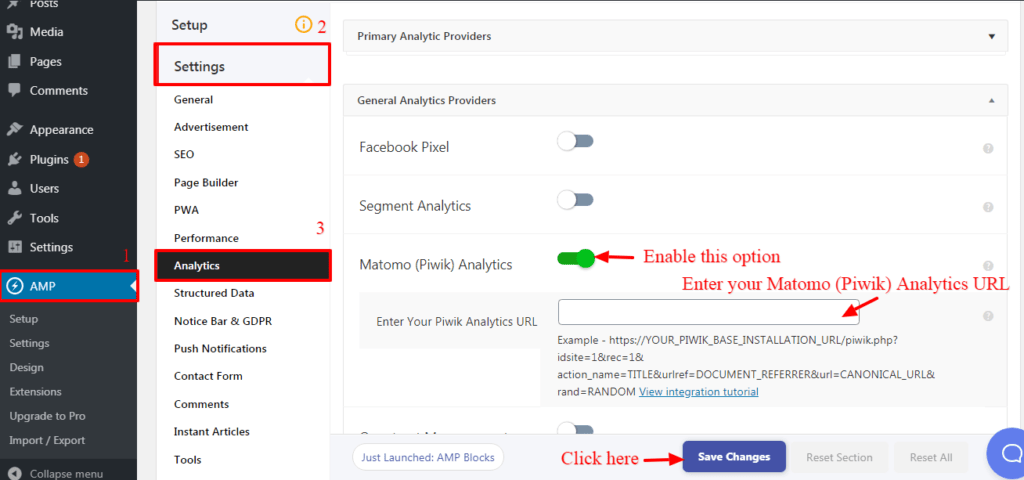
Step 1 – Go to WordPress admin area -> AMP option panel -> Settings -> Analytics.
Step 2 – Matomo (Piwik) Analytics: Enable this option you need to enter the Matomo (Piwik) Analytics URL.
Step 3 – Enter Your Piwik Analytics URL: In this filed you need to enter your Piwik Analytics URL. for example:( https://YOUR_PIWIK_BASE_INSTALLATION_URL/piwik.php?idsite=1&rec=1& action_name=TITLE&urlref=DOCUMENT_REFERRER&url=CANONICAL_URL& rand=RANDOM )
Required parameters
- Piwik base URL (required): Here you need to enter your Piwik base installation URL.
- idsite (required) – The ID of the website we’re tracking a visit/action for.
- rec (required) – Required for tracking, must be set to one, eg, &rec=1.
- action_name (recommended) -The title of the action being tracked. It is possible to use slashes / to set one or several categories for this action. For example, Help / Feedback will create the Action Feedback in the category Help
- urlref -The full HTTP Referrer URL. This value is used to determine how someone got to your website (ie, through a website, search engine or campaign)
- url (recommended) -The full URL for the current action.
- rand (recommended) – Meant to hold a random value that is generated before each request. Using it helps avoid the tracking request being cached by the browser or a proxy.
For Example:

Step 4 – Click on the “Save Changes” button and it will be displayed on your AMP pages.
If you enable this option it Can be tracked the Browser, Operating System, Time on Website/Page, Page Title, IP/Hostname.
That’s it for this tutorial!
We hope it helped you. If you have any feedback or questions, then please share them in the comments section below.
Ho do I integrate MATAMO? In your Tutorial only “Piwik” is described. Our Mataomo url lokks like this: https://btcecho.matomo.cloud
Is only Matamo (piwik) possible?
Best
Hi Mark Preuss,
We have already create a ticket and it will be released in the future update please follow this GitHub ticket – https://github.com/ahmedkaludi/accelerated-mobile-pages/issues/3757
Ho do I add the Tracking code from the matomo WP plugin to ampfor WP? I could not find anything on this page and the links above (7 month old) do not help as well. Unfortunately with the new data privacy laws non of the available tracking services can be used without showing a cookie banner 🙁
Hi Martin,
Will you please contact our technical team from here- https://ampforwp.com/support/ they will help you as soon as possible.
How should the URL look like when using the Matomo Analytics wordpress plugin?
Hi cruelly,
Will you please contact our technical team from here- https://ampforwp.com/support/ they will help you as soon as possible.
When I use your Matomo integration, I get “Page URL not defined” in the Matomo statistics. Is there a solution that the URL is also handed over here?
Hi Dw,
Will you please contact our technical team from here- https://ampforwp.com/support/ they will help you as soon as possible.
Hi,
I’ve used Matomo for a long time and well versed on Matomo generator. I wasn’t sure if the queries are variables or are static.
In your example
https://YOUR_PIWIK_BASE_INSTALLATION_URL/piwik.php?idsite=1&rec=1& action_name=TITLE&urlref=DOCUMENT_REFERRER&url=CANONICAL_URL& rand=RANDOM
The queries:
action_name=TITLE
urlref=DOCUMENT_REFERRER
url=CANONICAL_URL
url=RANDOM
Do I need to change TITLE, DOCUMENT_REFERRER, etc.. or are these variables that WP-AMP will change depending on the page, referrer, etc?
Please don’t respond by stating to contact AMP support at https://ampforwp.com/support. This is a general question and I think many users who use Matomo may want to know this.
Thank you,
Hi David Swanson,
You just need to add your base URL here by replacing it – https://YOUR_PIWIK_BASE_INSTALLATION_URL and the rest of the code will be updated automatically and you no need to worry about it.