
The Content Sneak Peek provides an easy way for hiding your full content and displays dynamic or static full content when someone clicks on the button.
Follow these simple steps:
You will find this option in the WordPress Dashboard -> Navigate to AMP option panel -> Design -> Single -> Enable “Content Sneak Peek” option and then click on the “Save Changes” button.

Scroll down a little to see this option
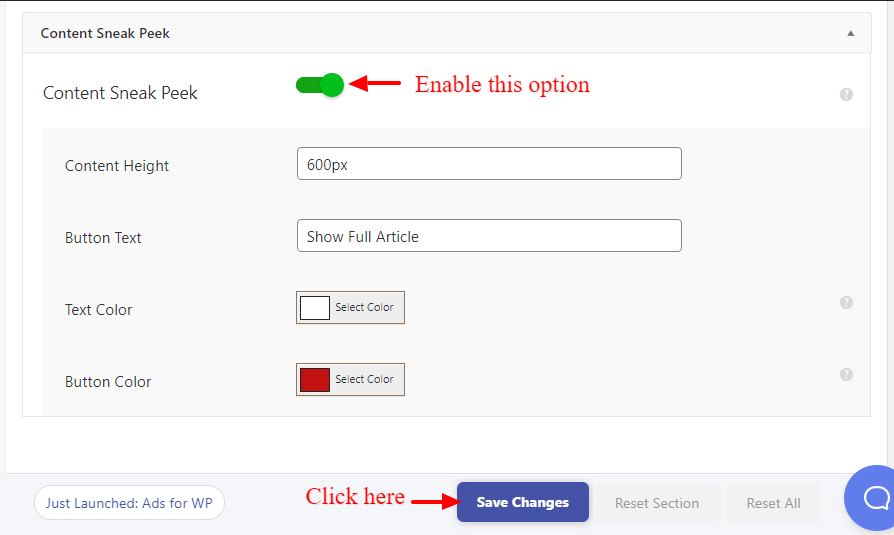
- Content Sneak Peek: Once you enable this option button will be shown on a single page we can set the Content Height, Button Text, Text Color, Button Color.
The output of the Content Sneak Peek

That’s it for this tutorial!
We hope it helped you. If you have any feedback or questions, then please share them in the comments section below.
Esto qué ventaja tiene?
Hi Alejandro,
Here are the benefits of Sneak content:
1) The best part of Sneak content is getting recognized by other bloggers, which results in quick and direct promotion of your blog and of course your too.
2)If your Sneak content is good enough to share around blogosphere then it is possible that even after a few days your Sneak content will surely drive traffic.
And If you have any issues/problems then please let us know.
Why NOT WORKING after update in Version:1.0.12 ?
Hi Ganisebastian,
We are already aware of this issue and we are working on it and it will be updated in upcoming updates please follow this GitHub ticket –
https://github.com/ahmedkaludi/accelerated-mobile-pages/issues/4069