
Design Selector
There are 4 designs in AMPforWP
When you activate the AMPforWP plugin, by default it will be Swift . You can change the design using Theme selector.
Follow the Step for Change the Theme Of AMP:
- From your WordPress dashboard, go to your sidebar. Head on over to AMP option panel -> Design -> Themes , Themes Selector option will be display on your screen.
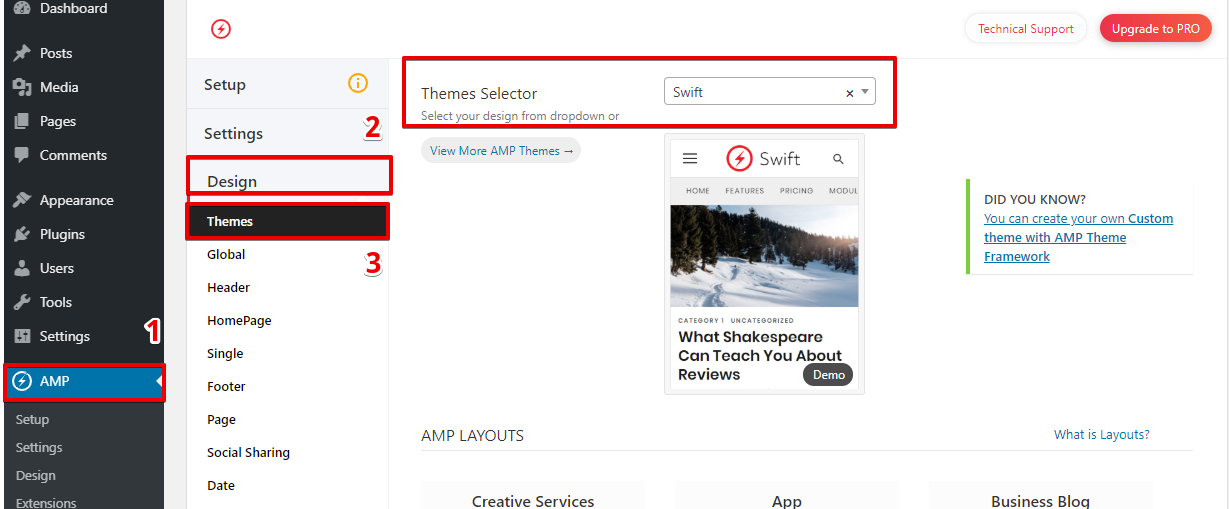
4. When you click on Themes Selector option list will be display.

5. You can even select your own AMP Theme from Theme Selector.
6. Click on the “Save Changes” button.
That’s it for this tutorial!
We hope it helped you. If you have any feedback or questions, then please share them in the comments section below.
Sir, I want to use my default theme in WordPress instead of ampforwp themes.
Hi Jaxon,
Will you please contact our technical team from here- https://ampforwp.com/support/ they will help you as soon as possible.