
Google AMP as you know is the latest technology to help accelerate the mobile pages, but it has strict standards as to what you can do, just like any good technology.
AMP does not stop you from using your creativity. You can literally do anything you want on top of AMP but it has to be in a right way or else it won’t pass the AMP validation.
Better Validation has been our number one priority while developing AMPforWP plugin, it provides even better validation than the AMP by Automattic plugin.
Even if AMPforWP has the best validation support, Google search console will still report validation errors in Accelerated Mobile Pages section and there could be hundreds of reasons behind these error reports.
I was trying my best to help everyone by fixing their validation issues manually in search console. I must have validated hundreds of AMP websites validated, I decided to make a troubleshooting guide which will help not only our users but to the whole AMP community!
Things to remember before Jumping
- Real Examples: I’m posting these solutions and problems while debugging, so the code that you will see is from one of the users of the plugin. It is possible that the solution is either same or similar to the one provided in the guide.
- Always under progress: We’re constantly updating this troubleshooting guide as we find new solutions.
- It’s gonna be fine: AMP troubleshooting can be overwhelming. So, if you find yourself lost in this article, that’s perfectly normal. Just spend some time and it will help you understand the concept.
- Get involved: Please get involved with us from the comments section.
Divide the Errors into Categories:
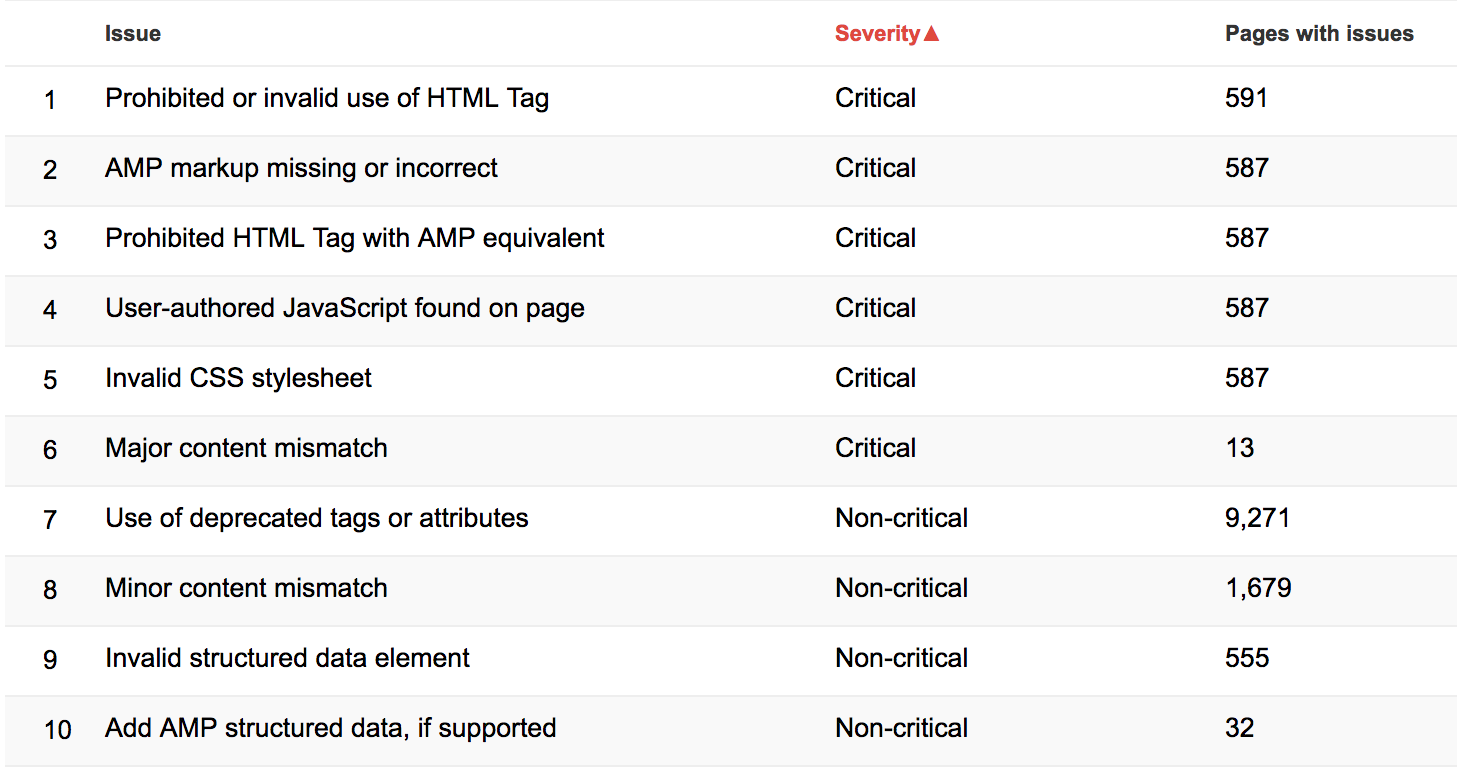
By default, GSC (Google Search Console) breaks down the errors into 10 categories.
- Prohibited or invalid use of HTML Tag
- AMP markup missing or incorrect
- Prohibited HTML Tag with AMP equivalent
- User-authored JavaScript found on page
- Invalid CSS stylesheet
- Major content mismatch
- Use of deprecated tags or attributes
- Minor content mismatch
- Invalid structured data element
- Add AMP structured data, if supported
We will also break the errors and their solutions into these categories.
1. Prohibited or invalid use of HTML Tag
- 1) The attribute ‘xml:lang’ may not appear in tag ‘span’.
This means that there is an attribute in the HTML tags, which are not allowed by AMP. When we check the source code of the AMP version, we found this:
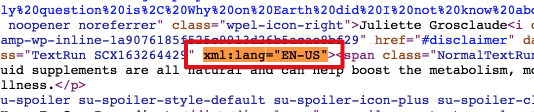
Solution: There are two ways of fixing this: One is that you go to your WordPress content editor, find this and remove this tag. If you want this tag then the second solution is that you use Content overwrite feature to serve different content to AMP version.
- 2) Multiple Errors in Categories and Tags Pages
The attribute 'prefix' may not appear in tag 'html ⚡ for top-level html'.

The mandatory attribute 'amp-custom' is missing in tag 'style amp-custom'.

Tag or text which is only allowed inside the body section found outside of the body section.

The attribute 'style' may not appear in tag 'img'.

The attribute 'type' may not appear in tag 'noscript > style[amp-boilerplate] - old variant'.
Solution: If you are getting multiple errors in just category and tags pages, then you don’t need to worry about this because we do not have AMP on categories and tags. It will probably take a few weeks until Google reindexes all the pages properly.
- 3) The attribute ‘target’ may not appear in tag ‘button’.
There is a target attribute in the AMP HTML which not allowed by the validation. When we run it with the AMP validator, we found this:

Solution: There are two ways of fixing this: One is that you go to your WordPress content editor, find this and remove this tag. If you want this tag then the second solution is that you use Content overwrite feature to serve different content to AMP version.
Back to you
Please share your issues in the below comments, we will try our best to help you provide solutions to them.
History: Last Updated: 12 Jan 2017
We are always updating this guide with better solutions as we find them.
These are common AMP errors reported in Google Search Console. Hope you have solved your error, if not then let us know what is the error you are facing in the comment section below.
I do not know what I should do with this message from google console. I have no idea where I could change the text… I just want to remove AMP from my blog as it was functioning before I used AMP!
“Der Text innerhalb des Tags “script type=application/ld+json” enthält “html comments”. Dies ist nicht zulässig.”
How do i remove AMP now?
Best regards
Magali
Hi Magali,
Will you please contact our technical team from here- https://ampforwp.com/support/ they will help you as soon as possible.
Hii Top2stock,
Having a issue in my website like “Linked AMP version is invalid” can anyone help me
Hi Top2stock,
Will you please contact our technical team from here- https://ampforwp.com/support/ they will help you as soon as possible.
Hi team,
I am facing the same issure for “AMP HTML Tag has an invalid layout specified by its attributes.” for
https://hairvair.com/
https://www.digitalvim.com/
Hi Simand Soon,
Will you please contact our technical team from here- https://ampforwp.com/support/ they will help you as soon as possible.
I have this error in google search console. How do I solve it?
AMP HTML Tag has an invalid layout specified by its attributes.
https://www.myfilmtime.com/nani-v-movie-first-look-poster/
Hi venkatesh,
Will you please contact our technical team from here- https://ampforwp.com/support/ they will help you as soon as possible.
Great content thanks for this you are try to do some best of peoples I will share this content with my friends once again thank you so much but my site has not solved this problam ho can i fix this problam my cool website
Hi Shivam Kumar,
Will you please contact our technical team from here- https://ampforwp.com/support/ they will help you as soon as possible.
I am Using Blogger . I want to use amp . How I can do it ?
https://www.swadeshiinfosystems.in
Hi Swadeshi Infosystems,
Will you please contact our technical team from here- https://ampforwp.com/support/ they will help you as soon as possible.
Hello,
I have an AMP Coverage issue that needs to be fixed. The message is “Linked AMP version is invalid”.
Below you can find an example of the links, apparently all of my links has the same problem.
http://highlywise.com/can-i-add-essential-oil-to-my-foundation/
Thank you
Nergis
Hi Nergis Yonet,
Will you please contact our technical team from here- https://ampforwp.com/support/ they will help you as soon as possible.
i am a very new in WordPress and no coding skill. i installed your plug-in and try to make all my dite as amp. then google told some JavaScript problems in header and told me to validate it and i did . then told me to pest in header. i pest the code in your plug-in’s insert heder options. then everything broke. i remove the plugins and clear cash. then re installed it. then there was a very big problems. the plug-in was not working and showing huge amount of code on the page. now i am using amp from the amp.dev…. but the plug-in is very poor and no option. i like your plugins. please help me to fix the problems.
Hi Adv. Md. Shahnewaz Zwaki Imon,
Will you please contact our technical team from here- https://ampforwp.com/support/ they will help you as soon as possible.
I’m getting below-mentioned errors on my site https://nextbuy.in/
Error. Referenced AMP URL is self-canonical AMP
Warning. Error in the required structured data element.
Hi Disha,
Will you please contact our technical team from here- https://ampforwp.com/support/ they will help you as soon as possible.
some of amp images got broken in post article and showing only image alt text in place of image.
most importantly, only problem occur in mobile version of amp not in desktop version.
how i can solve this issue?
please help
Hi Vaibhav,
Will you please contact our technical team from here- https://ampforwp.com/support/ they will help you as soon as possible.