
As default AMP displays the View Non-AMP Version Link in the footer, When the user clicks on it the page reloads with the standard mobile site. For, any reason if you want to Change/Disable View Non-AMP Version text then follow the instructions below.
First, make sure that you have AMP plugin’s activated on your website.
Change Non-AMP Version Text in Footer
You will find this option in WordPress Dashboard -> AMP option panel -> Settings -> Translation Panel -> Change the required Text -> Click on the “Save Changes” button.
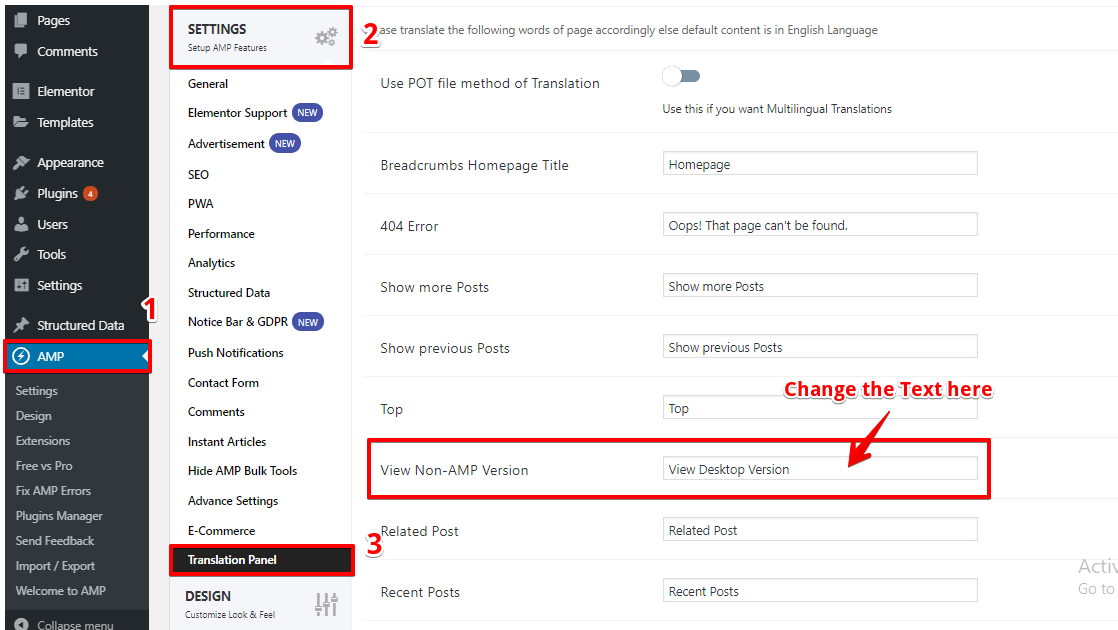
Tip: You can also change the Categories, tags, Footer text in the same Translation Panel.
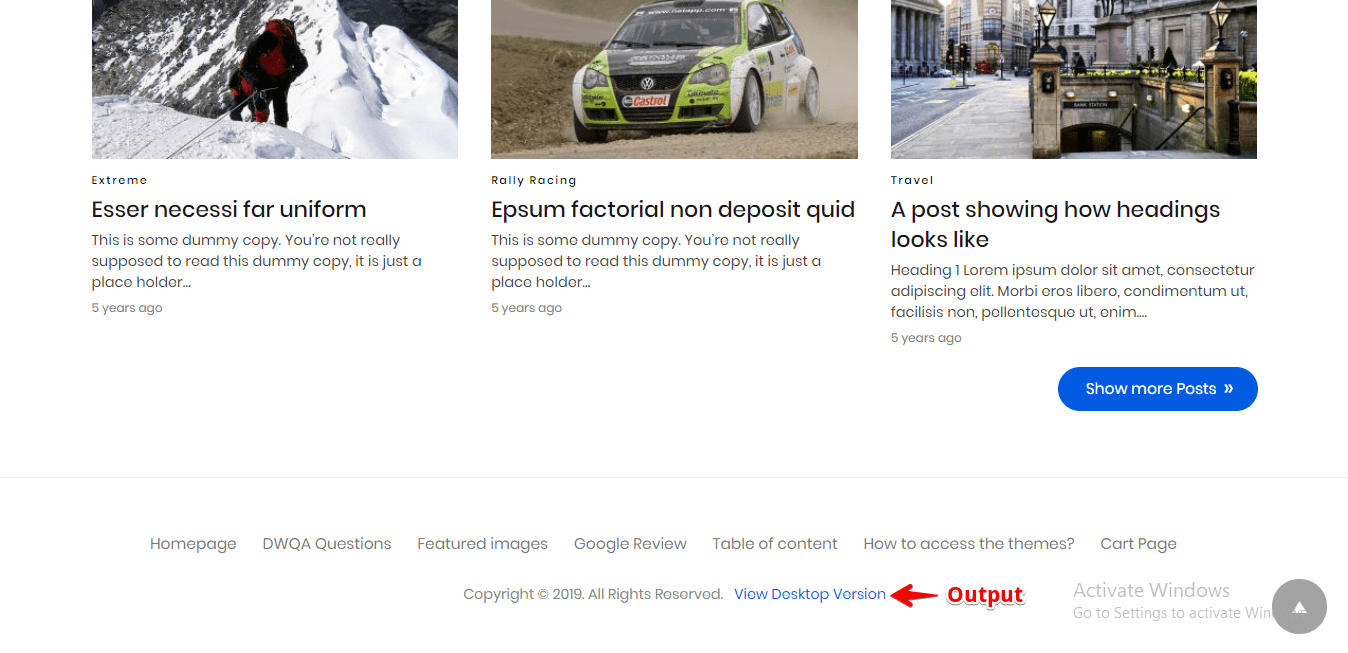
The Output of Non-AMP Version Text in Footer
Disable Non-AMP Version Link in Footer
You will find this option in WordPress Dashboard -> AMP option panel -> Design -> Footer -> Disable “Link to Non-AMP page in Footer” option -> Click on the “Save Changes” button

Before disable Non-AMP Version Link in Footer
After disable Non-AMP Version Link in Footer

That’s it for this tutorial!
We hope it helped you. If you have any feedback or questions, then please share them in the comments section below.
I have a problem when I click on the standard site link at the bottom of the page I am referred to the 404 error page I am not transferred to the main page of my site How can I solve this problem
Hi abedalmnam,
Will you please contact our technical team from here- https://ampforwp.com/support/ they will help you as soon as possible.
Hello Yes, this feature is useful at times. The question I have is I want to activate the feature, but when I click on it the error 404 appears. The page does not exist. How can I modify the link so that the user can convert to a desktop copy. Thank you
Hi abedalmnam,
Will you please provide us exact URL where you are having an issue so that we can check and fix it immediately.
Hi, I have an inquiry about this step, I activated it because I see it useful, but when I click on it a 404 error page appears for me. The page does not exist. I just want to modify the link in order for the user to convert to the desktop version of my site. Thank you.
Hi abedalmnam,
Will you please provide us exact URL where you are having an issue so that we can check and fix it immediately.
https://manbij.net/amp/
Also a new problem appeared to me, I apologize to you for the many questions. The problem is in displaying publications on the main page in the amp version. Publications appear, for example, when entering a tab, for example, the Android applications section. New articles appear, but on the main page, it does not appear until I do a blank cache of the site with work I have activated these Three options
Minify
Leverage Browser Caching
Optimize CSS (beta)
And you activate the add
ampCach
well, link of none-amp version of homepage will redirects to blog page. we have used custom front page. what should we do to fix this and redirect none-amp version to homepage (that custom page that is set for front page).
thanks
Hi yahya mousavi,
Will you please contact our technical team from here- https://ampforwp.com/support/ they will help you as soon as possible.
this is the url that I said that redirects to blog page. it should be go to home page
https://zeevou.com/?amp/&nonamp=1
Hi yahya mousavi,
Will you please contact our technical team from here- https://ampforwp.com/support/ they will help you as soon as possible.