
We are very happy to inform you that we are implementing Progressive Web Apps Feature in our Core Plugin is a free extension which is called PWA for WP
Progressive Web Apps (PWA) is a new revolutionary technology which makes your website into a web application and gives your user’s a native mobile app-like experience.
Initially, it was paid add-on but we’ve received many requests from our users to make it open source.
So keeping in mind our user’s request, we have decided to implement this feature in our core to make sure that our users can utilize the benefits of Web App functionality without paying any amount.
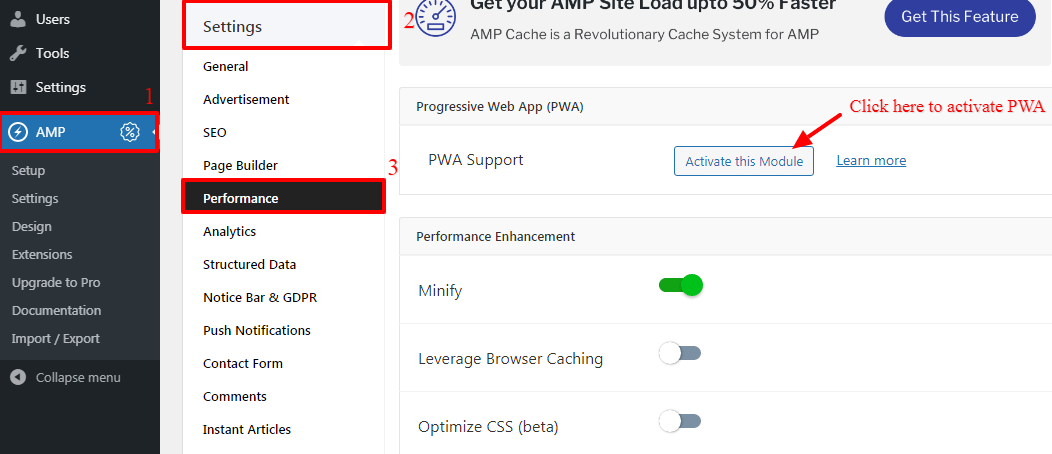
- You can install and activate the PWA plugin from our core plugin for this you need to go to the WordPress Dashboard -> AMP Option Panel -> Settings -> Performance -> Once you click on the “Activate this Module” button PWA is installed and activated.
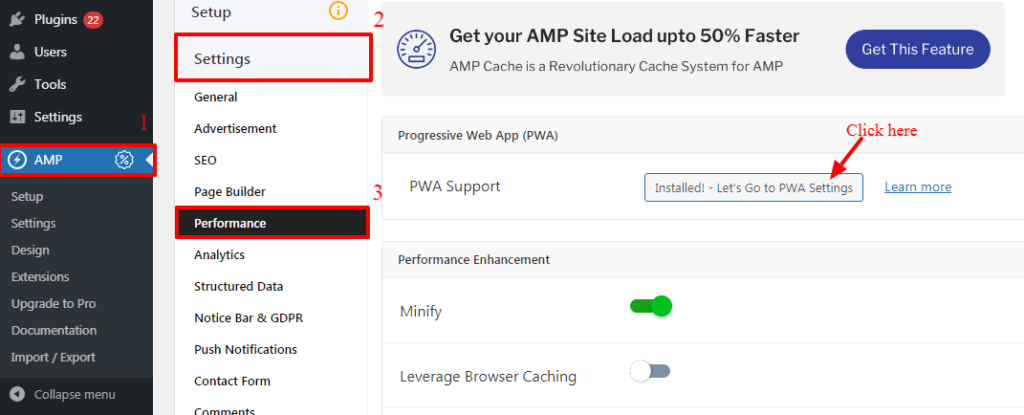
- Once you click on “Installed! – Let’s Go to PWA Settings” button it will redirect to the PWA setting option. you’ll find the New PWA option in the WordPress options panel from there you can set up the PWA for your Website.
- It works on both AMP and Non-AMP version
That’s it for this tutorial!
We hope we’ve clear your doubts in case If you have any questions, then please share them in the comments section below.
Everytime I enable PWA on my site my CPU spikes to 100% and I have to kill the plugin by deleting it. Tried it 4 different times now in a 7 month period.
Hi JoshWho,
Will you please contact our technical team from here- https://ampforwp.com/support/ they will help you as soon as possible.
can I increase website speed with this plugin because my site speed is very slow https://bestmattresser.in/best-mattress-in-india/ and please tell me the benefits of this plugin?
Hi Raja Shah,
Will you please contact our technical team from here- https://ampforwp.com/support/ they will help you as soon as possible.
Table of Contents not working in AMP. here is the url: https://www.bloggercage.com/doodle-maker-review
Hi Rohit Singh,
Will you please contact our technical team from here- https://ampforwp.com/support/ they will help you as soon as possible.