
We are very happy to inform you that we are implementing Progressive Web Apps Feature in our Core Plugin is a free extension which is called PWA for WP
Progressive Web Apps (PWA) is a new revolutionary technology which makes your website into a web application and gives your user’s a native mobile app-like experience.
Initially, it was paid add-on but we’ve received many requests from our users to make it open source.
So keeping in mind our user’s request, we have decided to implement this feature in our core to make sure that our users can utilize the benefits of Web App functionality without paying any amount.
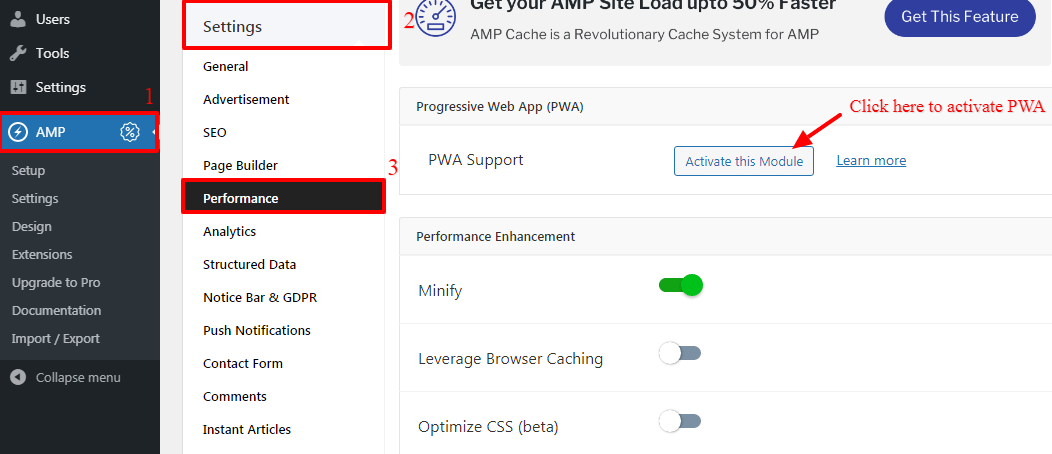
- You can install and activate the PWA plugin from our core plugin for this you need to go to the WordPress Dashboard -> AMP Option Panel -> Settings -> Performance -> Once you click on the “Activate this Module” button PWA is installed and activated.
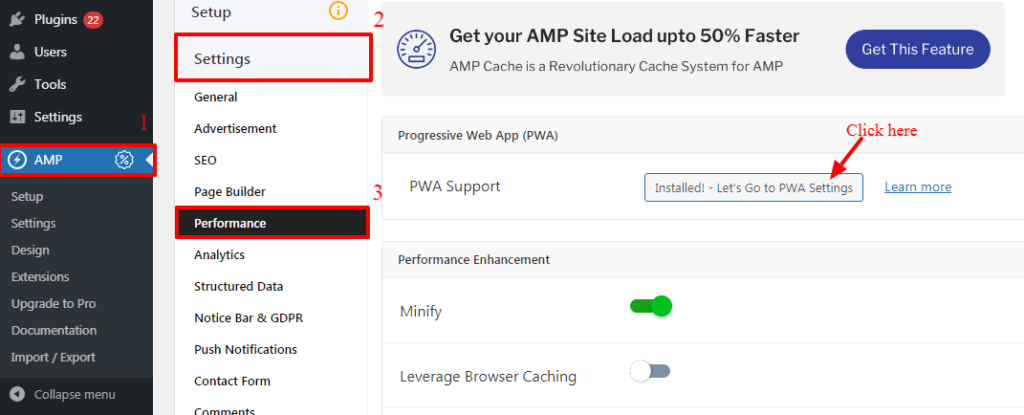
- Once you click on “Installed! – Let’s Go to PWA Settings” button it will redirect to the PWA setting option. you’ll find the New PWA option in the WordPress options panel from there you can set up the PWA for your Website.
- It works on both AMP and Non-AMP version
That’s it for this tutorial!
We hope we’ve clear your doubts in case If you have any questions, then please share them in the comments section below.
Hi
Thanks for this tutorial I have implemented on the website but I don’t know how long it’ll take for getting an effect on the website at https://deal24by7.com/
Thanks again
Hi victor dawson,
We have checked your website and found that PWAforWP plugin is not activated on your website because of cache is not clear on your website will you please clear the cache and still if you are facing issue/problem then contact our technical team – https://ampforwp.com/support/ they will help you as soon as possible.
Hi, I want to uninstall PWA from my site. What should I do? just uninstall the plugin or do I have to delete any file with the help of file manager?
Hi Pradip,
Will you please tell us why you want to uninstall it? and if you are facing any issue then please let us know and we will definitely fix it for you.
How Do I activate PWA for my website https://trysomecoupon.com
Please help me and is it important to use it?
Hi Onam Sharma,
To use this PWA for WP & AMP plugin click here to install and activate PWA for WP & AMP plugin and Will you please follow this documentation click here And if you have any issues/problems after following this tutorial also then please let us know and we will personally help you.
The amp version of my site is still not available https://news.ng
please help
i also discovered that google ads are not showing on mobile
Hi David Moses,
Will you please provide us exact URL where you are having an error so that we can check and get back to you.
Hi David Moses,
Have you enabled the custom frontpage in AMP? Will you please disable it and check once and also will you tell us how you are adding the content in the WordPress editor.
hey i want to close the pwa…..
How can i able to do this
Hi Biswa Prakash Swain,
Will you please disable PWA and clear server-side and browser cache and if you have any issues/problems then please let us know.
Hi,
Thanks for sharing helpful knowledge.. i like this plugin work perfectly on my website also, improve the loading speed in amp.. but i got one problem i have placed the analytics code on the website but the traffic not showing in google analytics i don’t why? if you any idea please do the answer… here is my website link https://torrents-proxy.com/ waiting for the reply.
Thanks
Trivanks
Hi Trivanks,
Will you please contact our technical team from here- https://ampforwp.com/support/ they will help you as soon as possible.
work fine here: https://iberomedia.com/
thanks!
Hi can you please check, what is wrong here
https://hindishayariyan.online/
Hi Robin,
Will you please contact our technical team from here- https://ampforwp.com/support/ they will help you as soon as possible.
After using Amp my front page is working fine but when I try to open any post. Screen becomes blank in both PC and Mobile. My Website is Theozonetech.com
Hi Rajat Bisht,
Will you please contact our technical team from here- https://ampforwp.com/support/ they will help you as soon as possible.
how to get app in your mobile
Hi Malik Umair,
Will you please elaborate more about your issue so that we will understand and help you.