
A NewsArticle is an article that will help you to get your page included in Google News. In this guide, we will be looking solely at opportunities to implement Schema.org markup, as this is the most extensive vocabulary for our purposes. Also, because it was developed by the search engine companies themselves.
Follow the steps to set up news article schema:
Step 1 – Go to WordPress Admin Area -> AMP Option Panel -> Settings -> Structured Data -> Click on Upgrade for Free.

Step 2 – Structure data is successfully installed and click here for Structure data settings

Step 3 – Structure data option is available on WordPress dashboard -> Structure data -> Click on Add Schema Type.

Step 4 – In this option select NewsArticle option after that click on next.

Step 5 – Select here condition here where you want to display new article and after that click on Next

Step 6 – It will show below this message schema added successfully

Step 7 – Below the screenshot, new article schema added click on “update” button

Step 8 – JSON -LD is successfully added on source code
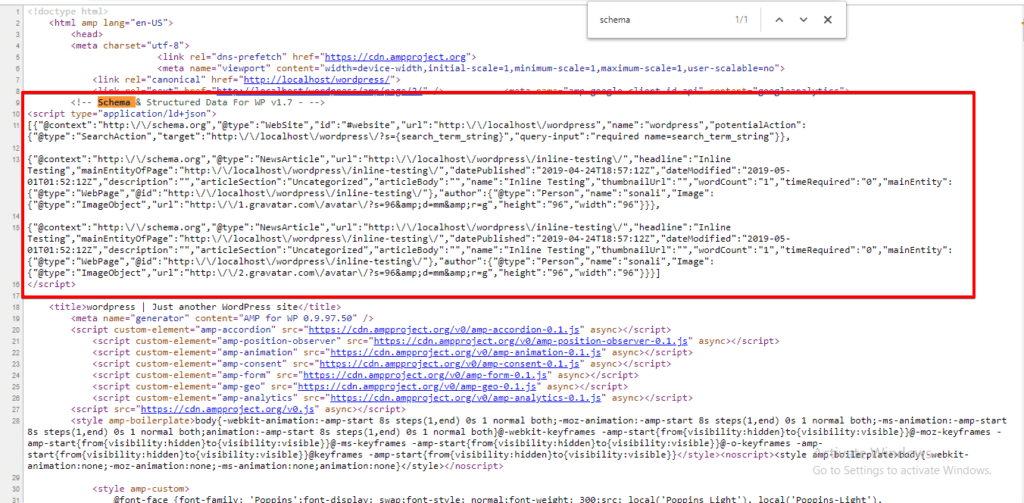
Step 9 – Once everything is set then test your structure data in Google Structure Data Testing Tool

Step 10 – If your structure data source code is correct then it will not show any error.

The output of New Article in Google News :

That’s it for this tutorial!
We hope it helped you. If you have any feedback or questions, then please share them in the comments section below.
How To Enable NewsArticle Schema For a Non-AMP Blogspot Blog?
Hi Sandy,
If you want to enable NewsArticle Schema for Non-AMP for this you need to install our Schema & Structured Data for WP & AMP plugin.
Will you please disable “Structured Data for AMP” option and enable “Structured Data for Non-AMP” for this follow these steps WordPress dashboard -> Structured Data -> Settings -> AMP like below the screenshot -> https://prnt.sc/ppz31l
And still, if you are facing issues/problems then contact our technical team -https://ampforwp.com/support/ they will help you as soon as possible.
Hi,
Why AMP validator is giving warning about invalid structured data on Archive Pages
Hi Azhar Nadeem,
Will you please provide us exact URL where you are having an issue so that we can check and fix it immediately.
Hi Sonali,
Thanks for support. Its on all the category pages. For example
https://www.sportscourant.com/sports/soccer?amp
On validation page following message appears.
Missing or invalid structured data item
A required property in your structured data is missing, misspelled or has an invalid value.
Regards
Hi Azhar Nadeem,
We have checked your website and found that there is no error at the moment -> https://prnt.sc/r127dk and still if you are facing issue/problem then contact our technical team – https://ampforwp.com/support/ they will help you as soon as possible.
Hi,
Thanks for your response. Please have a look at this screenshot
https://prnt.sc/r1b7bj
Thanks
Hi Azhar Nadeem,
Could you please add Article schema or News Article Schema on your website and please let us know if there’s anything else we can do.