
In this tutorial, we will guide you to optimize AMP for Google PageSpeed insights by showing you some of the most common issues along with ways to solve them.
Here is a list of Google PageSpeed insights most Common problems
- Remove Unused Javascript: That has AMP Url’s
- Eliminate render-blocking resources: …css/all.css(use.fontawesome.com)
1. Remove Unused Javascript: That has AMP Url’s

- Remove unused JavaScript – Usually, this is not a problem but this time, it has AMP scripts in it. Recently Google has changed the ads to AMP4Ads, now those “unused” URLs are actually getting loaded in the iframe. So that is also being counted as unused, which should not be the case actually this thing is confusing a lot of people. In reality, the script isn’t loading, so there is no performance issue or slow down in speed as the report might suggest.
- Eliminate render-blocking resources – Font awesome CSS is loading, to solve this, use CSS Icons from https://take.ms/hiVy7
2. Eliminate render-blocking resources: …css/all.css(use.fontawesome.com)
The goal is to reduce the impact of these render-blocking URLs by inlining critical resources, deferring non-critical resources, and removing anything unused.
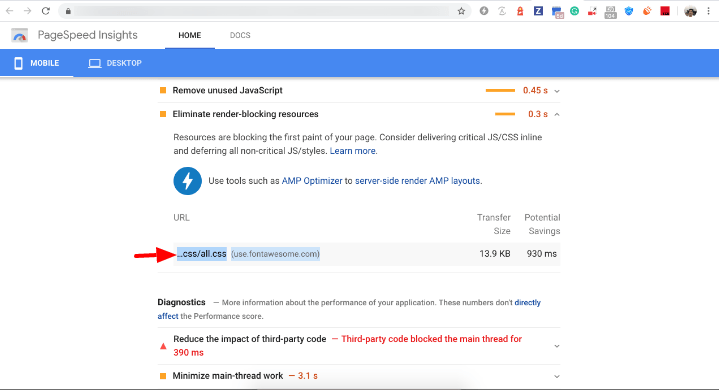
Font Awesome CSS is loading, to solve this, use CSS Icons from AMP settings for this follow the below screenshot.

That’s it for this tutorial!
We hope it helped you. If you have any feedback or questions, then please share them in the comments section below.
Hi guys,
Question. Why does my AMP Page have Poor load times than my Responsive Page when I run Lighthouse Audits? Shouldn’t it be the other way around? Particularly FCP and LCP. Here’s one page https://argen-travel.com/things-to-visit-in-patagonia/amp/ Any ideas you can send my way are welcome!
Thank you!
Hi Havi Goffan,
Will you please contact our technical team from here- https://ampforwp.com/support/ they will help you as soon as possible.
I still have the Eliminate render-blocking resources: …css/all.css(use.fontawesome.com notice even if I change to CSS Icons.
I am using Elementor Pagebuilder compatibility.
Any suggestion?
Hi Carlos Barraza,
Will you please contact our technical team from here- https://ampforwp.com/support/ they will help you as soon as possible.
How to remove render-blocking font in Amp Html.
Hi Arun,
Will you please contact our technical team from here- https://ampforwp.com/support/ they will help you as soon as possible.