The goal of this tutorial is to modify the https server, which presently is set to our secure API, but if you follow this tutorial, you will be able to host it through your domain.
Please follow the following steps:
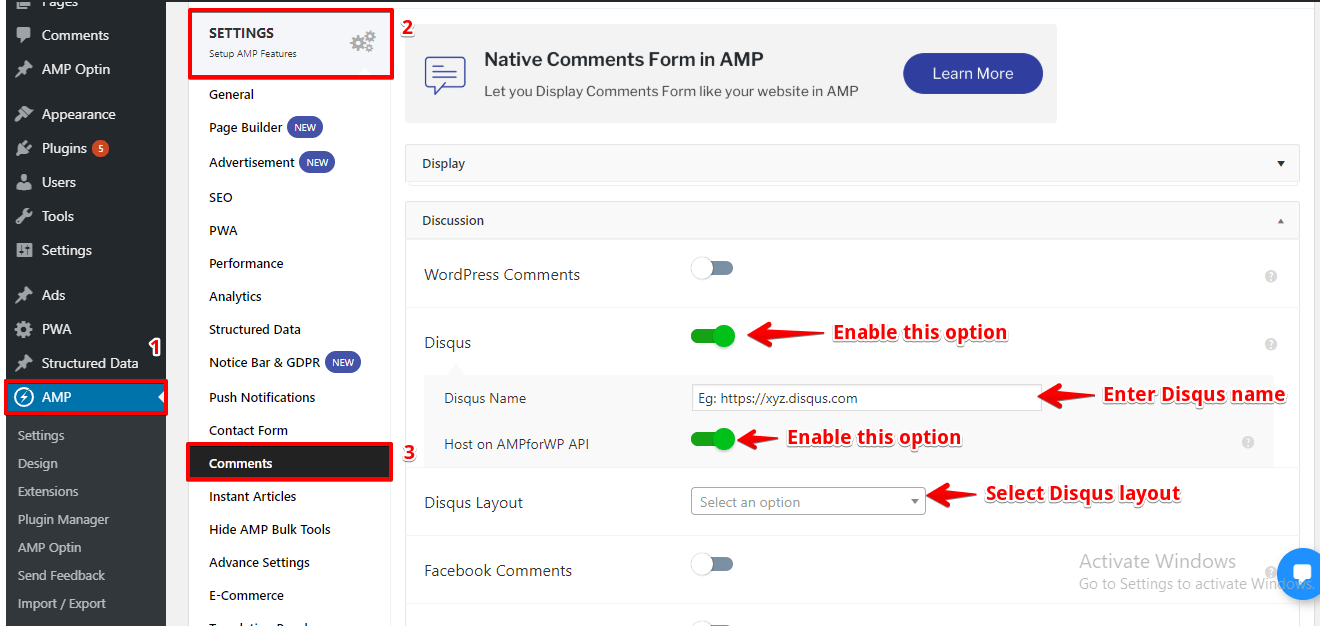
1. Switch off the option that is highlighted in the below screenshot, that will turn off the hosting from our secure API to your website.
2. You will find this option in AMP option panel -> Settings -> Comments -> Enable Disqus option.
3. Now let’s create a new host file from your HTTPS server. You will be presented with this option to enter your host file URL(which should be over HTTPS server).
For that, you need to create a subdomain on your website which you can do it from your Cpanel and you need to make sure that the subdomain also has the https installed.
Once you have both setups, you need to create a new file in that subdomain folder with the name “disqus.php”. In that file, you need to place some code that is required by the Disqus, which you can find in the below gist.
Once you have created and added the code, then you must upload that to the server and now you will have a URL like: https://comments.example.com/disqus.php. If you are trying to open that URL and it return the blank screen then don’t panic. Just proceed with the article.
Then go to the options and paste that URL into the field with the name “Disqus Host File” like the below screenshot.
Now, check your website article, it should have the Disqus comments installed.
Links to more resources for Disqus:
Disqus in AMP by Tomasino Labs
Disqus installation by Official AMP Project
Disqus Blog post by Disqus.com
Back to you
I really hope it helps you. Let us know your thoughts in the comments below.
That’s it for this tutorial!
We hope it helped you. If you have any feedback or questions, then please share them in the comments section below.
If you want to add an AWeber form in AMP then first you need to…
Webpushr is the fastest growing web push notifications platform that marketers love & developers rely…
Follow these steps to add Adobe Analytics in AMP Step 1: Go to WordPress Admin Area -> AMP…
Core Web Vitals are the subset of Web Vitals that apply to all web pages,…
The following reasons can be shown for non-indexing. Server error (5xx) Your server returned a 500-level…
We have added the Google Analytics 4 ( GA 4 ) integration in AMPforWP v1.0.80.…