There are 4 designs in AMPforWP
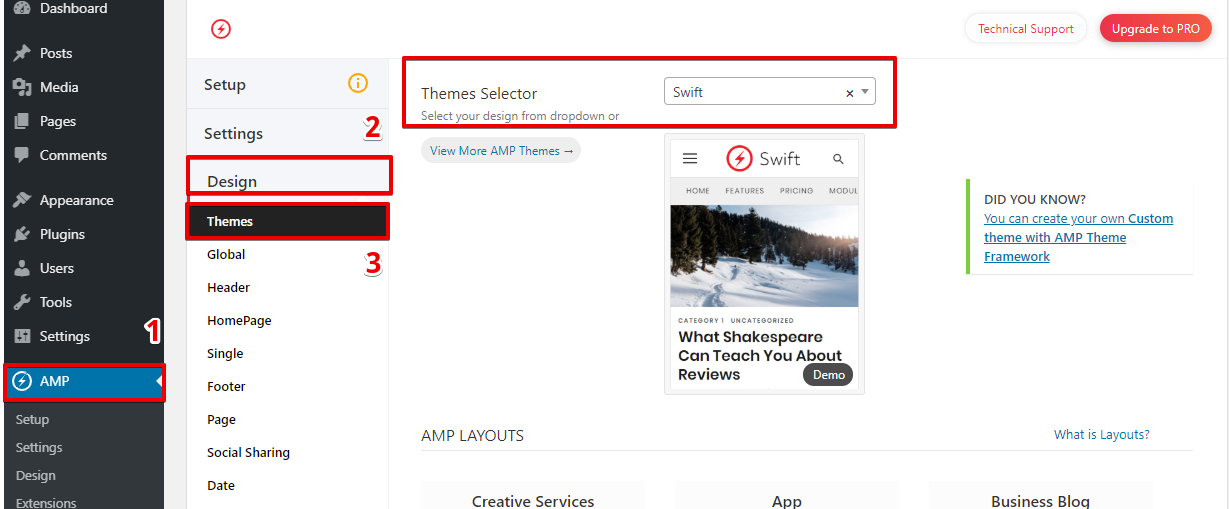
When you activate the AMPforWP plugin, by default it will be Swift . You can change the design using Theme selector.
Follow the Step for Change the Theme Of AMP:
4. When you click on Themes Selector option list will be display.
5. You can even select your own AMP Theme from Theme Selector.
6. Click on the “Save Changes” button.
That’s it for this tutorial!
We hope it helped you. If you have any feedback or questions, then please share them in the comments section below.
If you want to add an AWeber form in AMP then first you need to…
Webpushr is the fastest growing web push notifications platform that marketers love & developers rely…
Follow these steps to add Adobe Analytics in AMP Step 1: Go to WordPress Admin Area -> AMP…
Core Web Vitals are the subset of Web Vitals that apply to all web pages,…
The following reasons can be shown for non-indexing. Server error (5xx) Your server returned a 500-level…
We have added the Google Analytics 4 ( GA 4 ) integration in AMPforWP v1.0.80.…