How To Install & Setup PWA in AMP

You can give the APP-like experience to your audience which will get your website to their home screen and works instantly like an APP with offline support. It’s pretty easy for you to setup because it works out of the box. Here are the steps:

  1. Download and Install the extension from the account area.
  2. Upload and Activate it.
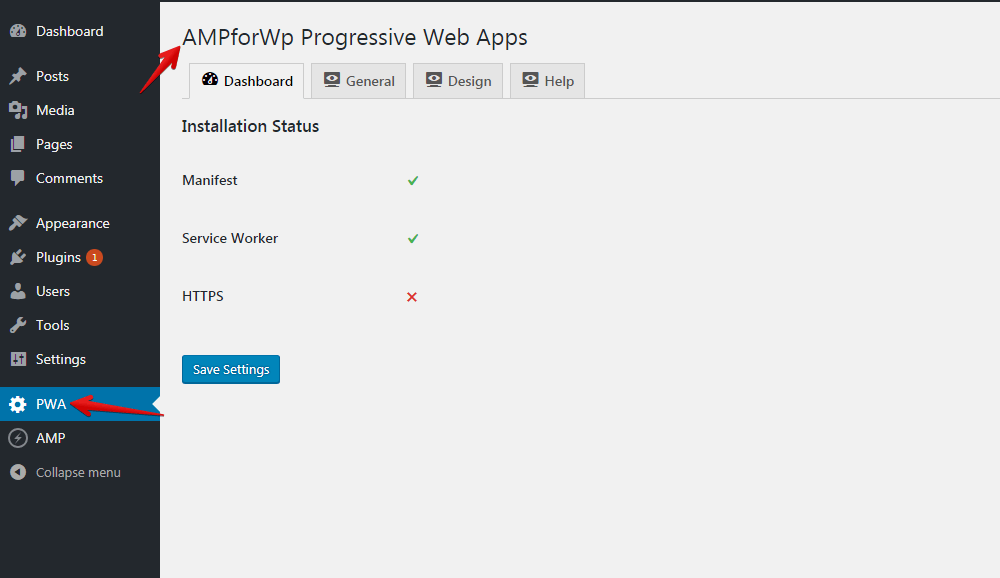
  3. Now the PWA option will be displayed in the WordPress options panel.
  4. After clicking the PWA option you will be able to see the Dashboard option in which it will automatically be detected the Installation status of Manifest, Service Worker, and HTTPS.
  5. After the dashboard click on General (Besides) in which you can set the Application Name, Application Icon, Application Splash Screen Icon and etc.
  6. Similarly, you can click on the Design option in which you can set the background color and Theme color.

This tutorial is just the overview of PWA options we will be publishing the complete tutorial shortly with a brief description.

We hope it helped you. If you have any feedback or questions, then please share them in the comments section below.

Share
Published by
Kaleem

How to create an AWeber form in AMP

If you want to add an AWeber form in AMP then first you need to…

3 years ago

How to setup webpushr notification in AMP

Webpushr is the fastest growing web push notifications platform that marketers love & developers rely…

3 years ago

How to add Adobe Analytics in AMP

Follow these steps to add Adobe Analytics in AMP Step 1: Go to WordPress Admin Area -> AMP…

3 years ago

What is the CWV plugin all about

Core Web Vitals are the subset of Web Vitals that apply to all web pages,…

4 years ago

How to fix “Alternate page with proper canonical tag” Page Index issue in Google Search Console

The following reasons can be shown for non-indexing. Server error (5xx) Your server returned a 500-level…

4 years ago

Google Analytics ( GA4 ) integration in AMPforWP

We have added the Google Analytics 4 ( GA 4 ) integration in AMPforWP v1.0.80.…
4 years ago