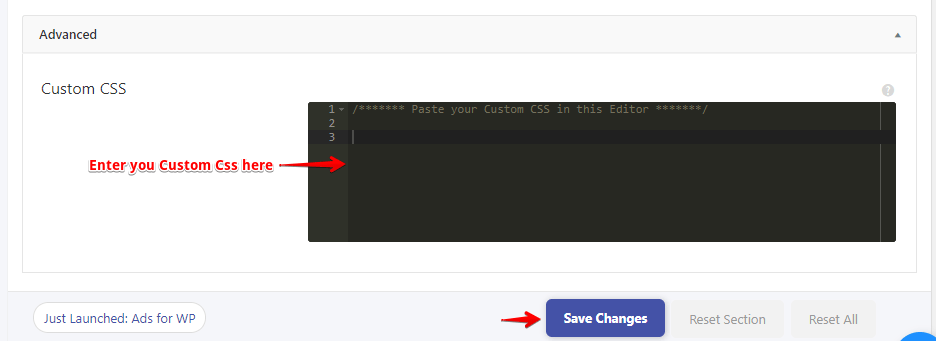
Yes, it is possible to Change Font Style in AMP. You can change the font style in AMP with the help of Custom CSS.
Follow this simple steps:
First, go to the WordPress Admin Area -> AMP option panel -> Design -> Global -> Custom CSS option
Scroll down a little to see this option
Here is an example:
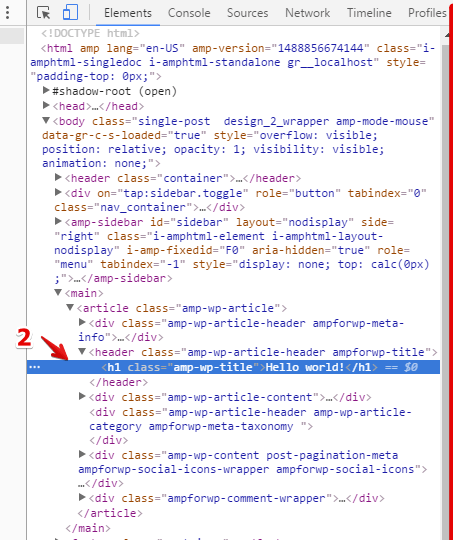
First of all, inspect Element where you want to change the Font style.
In the above Screenshot, you can see Inspecting Hello World and also the Class name of Hello World i.e., h1 .amp-wp-title
You can also look check HTML to find the class name, please refer to the below screenshot
here you can see the Class name of Hello World. With the help of class you can start styling. You can change font style, you can change font color etc.
Before Adding Custom CSS, you can test your CSS. Paste your CSS in Styles section of your Browser. Please refer to this screenshot
in h1 .amp-wp-title you can do modifications according to your requirements
h1 .amp-wp-title {
 font-family: Lato;
 font-weight: bold;
 font-size: 20px;
 color: red;
}That’s it for this tutorial!
We hope it helped you. If you have any feedback or questions, then please share them in the comments section below.
If you want to add an AWeber form in AMP then first you need to…
Webpushr is the fastest growing web push notifications platform that marketers love & developers rely…
Follow these steps to add Adobe Analytics in AMP Step 1: Go to WordPress Admin Area -> AMP…
Core Web Vitals are the subset of Web Vitals that apply to all web pages,…
The following reasons can be shown for non-indexing. Server error (5xx) Your server returned a 500-level…
We have added the Google Analytics 4 ( GA 4 ) integration in AMPforWP v1.0.80.…