You can integrate Star Rating with the help of an extension called AMP Rating
It’s pretty easy for you to set up because it works out of the box.
Here are the steps:
- Download and Install
- Upload and Activate
- Done! The AMP Rating will be visible on the AMP version of your site.
For more details how to upload extension click on this link Upload and Install.
With the help of our Rating extension, you can add the rating star easily.
It’s very easy to use the ratings extension. When you are editing a post, simply enter the number of stars you would like to give in the meta box which appears on the right side of the post edit screen. See the screenshot for reference.
So, after you add the value, it will be displayed on the top of the post like below screenshot.
Here is the list of all the rating plugins which are fully compatible with our AMP rating extension
- KK star ratings
- Wp Customer review
- WP-PostRatings
- WP Review
- Multi Rating
- Taqyeem
- Yet Another Star Rating
- WP Recipe Maker
- Shortcode Star Rating
- Not finding your plugin here? Please contact us to make it compatible after Purchase.
How to Set up a rating feature in AMP?
First of all, you have to install any of the below Three plugins:
- KK star ratings
- Wp Customer review
- Yet Another Star Rating
Follow the simple steps of AMP Rating.
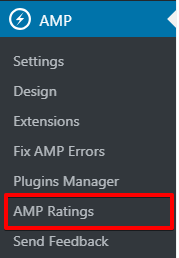
From the dashboard, we go to the left-hand side in Menu bar go to AMP option panel –> AMP Rating.
How to Set up KK Star Rating in AMP
First, you need to install “KK Star Rating plugin” and active after that this option will appear.
- Go to WordPress Admin Area -> AMP option panel -> AMP Ratings -> Enable KK Star Rating Compatibility for AMP option
- KK Star Rating Compatibility for AMP: If you enable this option star rating will be displayed on amp post/pages. Click on the save changes button.
The output of KK Star rating Compatibility with AMP:
How to set up Wp Customer review in AMP
First, you need to install “Wp Customer review” and active after that this option will appear.
- Go to WordPress Admin Area -> AMP option panel -> AMP Ratings -> Enable WP Customer Reviews Rating Compatibility for AMP option
- WP Customer Reviews Rating Compatibility for AMP: Enable the option and click on the “Save Change” button.
After enabling this option the below output will be rendered.
To submit your review click on create your own review button.
How To set up Yet Another Star Rating in AMP
First, you need to install “Yet Another Star Rating” and active after that this option will appear.
- Go to WordPress Admin Area -> AMP option panel -> AMP Ratings -> Enable YASR Rating Compatibility for AMP option
- YASR Rating Compatibility for AMP: If you enable this option star rating will be displayed on amp post/pages. Click on the save changes button.
How to set-up the positioning of amp rating
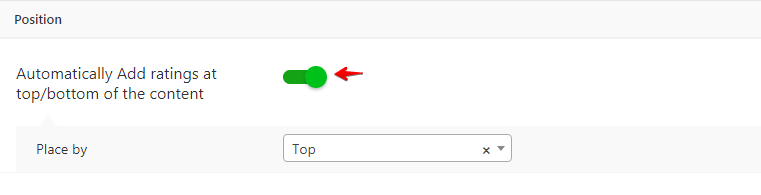
Automatically Add ratings at the top/bottom of the content: If you enable this option you can place Automatically rating at the top or bottom.
That’s it for this tutorial!
We hope it helped you. If you have any feedback or questions, then please share them in the comments section below.